Voice Effects in Avatar Messages
Avatar messages have voice effects that change the pitch of the recorded message. Each avatar has an associated voice effect that is of a higher or lower pitch than the normal range.
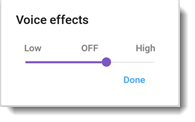
You can adjust or turn off voice effects when you compose an avatar message.
To adjust the voice effects when you compose a message
1. In the Inbox, tap the overflow menu  and then tap New Avatar message.
2. Record your avatar message.
3. Tap the overflow menu and then tap Voice effects level.
Note: You can also turn off voice effects by clearing the check box next to Voice effects.
4. Drag the slider between Low and High to change the pitch. You can also set the voice effect to OFF (no effects). This will affect only the current message. Tap Done.
5. To preview the message, tap the play button in the playback controls.
 .
.